Flight CodeX
  • Home
  • About
  • News
  • Contact
  • Documentation

News

Ubuntu 24.04 Minimal Installs

11/5/2025

0 Comments

 
A bit of a tech note. In testing we have found that minimal desktop installs of Ubuntu are missing some shared libraries that crash the installer, studio and the runtime. If you are running on Linux and try to run the installer nothing happens try to run the installer with the terminal this will show what libraries are missing the most common are the ones involving openGL.  
0 Comments

Update to the Installer

9/27/2025

0 Comments

 
There was a bug that would not download the included asset and demo scenarios this has been fixed with this installer.
0 Comments

Quick Patch v0.1.85-beta

9/22/2025

0 Comments

 
Hey Everyone,
We tracked down and fixed a bug with the target triggers that caused targets to appear at the wrong heading. This only showed up when creating window targets larger than a kilometer — so it’s great to have that one squashed before the upcoming Virtual Pulitzer Trophy Race!
Along the way, we also fixed a camera placement bug and smoothed out a couple of script generation issues when setting the camera to AGL.
 
Picture
0 Comments

Lights-Camera-Action 0.1.8 Notes

9/5/2025

0 Comments


Emergency Installer Fix 

We had an issue with the installer and Windows that crept up and was not able to connect to the servers and is now fixed. also there was a chance that the installer on error could leave the plugin folder empty we have implemented a better strategy and error handling so you wont loose hard work. Also while we where in there we spruced up the interface a bit to provide more information... well it was added for us to debug the issue but think it provides a better Experience so you know what is going on.  Thank you for your understanding  the new installer can be downloaded here 
Picture

Original Release Notes

We are back with another update to Flight Code-X. Fixed a bunch more bugs and added a couple of features. With Flight Sim Expo behind us and summer time wrapping down, the kids are back at school the work is easier to get out the door.

In this release we added camera controls this has been a feature that we are excited about and all the possibilities. Show off those amazing flights, create air tours, script that pre-flight walk around or craft a complete event broadcast!  There is camera tracking and location tracking you can place around the aircraft and stabilize like a news cast  or make it look like a camera is bolted to a strut. this is the first set of features for the camera but should cover most needs.
Picture
Picture

We have also added a control node for scheduling other nodes.  This was primarily added to fix a problem with runaway trigger nodes when soft resetting scenarios without a full restart. But it is also nice to have an extra flow control for potential groupings of logic.
Picture
Picture

For ease of testing repays have been quite valuable especially for camera work. In the last release we added the ability to load replays with the scenario and found it's decently reliable to trigger and test Flight Code-X's features. This update we have added the ability to auto save replays when the scenario ends. making us the closest thing to a Replay editor set the start conditions and the end conditions fly the the flow and BANG!  a replay that starts and ends with no beginning or ending fluff.  The repays save to the scenario output folder in the Flight Code-X plugin folder with the scenario name and a time stamp.  Combine this with the FDR and log and there is a ton of data.
Picture

Features:
- Node control and scheduling
- Save replay when scenarios end
- Camera controls
- use data refs for penalty add time

bugs:
- FDR uses the actual plane loaded not the one defined in the scenario
- FDR recording when other data refs are set
- AGL option in trigger nodes when object is set as target
- Calc node deleting steps when multiple data refs are added
- Load button now works to load selected scenario
- UI windows only opened once in VR
- String data refs getter and setter now correctly resizes fixing load new scenario on end 
- Stop scenario now ends properly if not loading a new scenario
- Monitor node now updates name across the scenario
- when saving over a existing file now works as expected
- bunch of back of the machine stuff

0 Comments

New release New possibilities 0.1.7 Notes

2/27/2025

0 Comments

 
After a whirlwind adventure getting the last release together and fixing major technical issues, version 0.1.7 introduces features that open up new scenario possibilities.
New possible challenges include race-against-the-clock scenarios, where every action adds time to the countdown, or structured procedural sequences where following the correct steps can avert disaster. You can even create gate-to-gate time trials.
Major EnhancementsControllable Randomization:
The calc node now supports randomized data, including time and geographical locations, allowing for dynamic scenarios. The original random path node enabled multiple possible scenario paths, but the new calculations take it further—simulate radio failures that change frequencies or create search-and-rescue missions.
Advanced Calculations:
Two new calculations have been added to the calc node to enhance precision:
  • Distance & Bearing Calculations: Compute the precise distance and bearing between two points.
  • Search & Rescue Integration: Modify the heading bug or flight director to point toward a point of interest, or set up a STOL competition by tracking landing and stopping distances.
Point Triggers & AGL Altitudes:
  • Point triggers can now activate when exiting an area, enabling new waypoint proficiency assessments.
  • The new terrain probe allows setting altitudes using AGL (Above Ground Level), making it easier to handle different scenery packs and replicate real-world scenarios.
Scenario Management Improvements:
  • Scenarios can now load other scenarios upon completion.
  • New command-line options allow automatic scenario loading on startup.
  • Bindable commands for reloading and stopping scenarios, as well as X-Plane's web API support, allow for remote scenario management.

What's Next?This release significantly enhances the system’s flexibility. Moving forward, our focus will be on revamping documentation and publishing tutorials. We will also continue developing planned features, particularly object animation and multi-aircraft scenarios to improve training for:
  • Wake turbulence
  • Formation flying
  • Other multi-aircraft environments

New Features
  • Canvas UI: Resizable and persistent definitions/info areas
  • Terrain Probe Enhancements:
    • New AGL checkbox
    • Start position altitude setting
    • Target altitude setting
    • Aircraft position adjustment
    • Object altitude editing
  • Scenario Management:
    • Data ref for scenario loading
    • Commands for loading and reloading scenarios
    • Command-line option: --fc_start=<scenario_path> (e.g., --fc_start=scenarios/demo/First_look)
    • Stop node can trigger a new scenario
  • Calculations & Timers:
    • Distance and bearing calculations (point to point)
    • Altitude probe calculations
    • Random number generation
    • Multi-timer control (per node)
    • Timer adjustments (add time, start random timers)
  • Point & Loop Triggers:
    • Point trigger activation on exit
    • Loop monitor node

Fixes & Improvements
  • Improved scenario save logic
  • UI cleanup and refinements
  • Better scenario generation
  • Enhanced object loading and cleanup
  • Fixed path issues between Linux & Windows
  • Title bar now matches system settings
  • Improved Windows save dialog uniformity
  • Timer display fixes

This update brings substantial quality-of-life improvements and resolves key pain points reported by users. We appreciate your feedback and look forward to enhancing FlightCodex even further!
0 Comments

Built, Compiled, and Ready to Fly—v0.1.6 is Here!

1/31/2025

1 Comment

 
After a long battle with an OpenGL issue that broke the new loading screen, we’re back with version 0.1.6!
This update primarily improves the UI backend, but we also managed to introduce a few new features. Now that the UI is stable, we can focus on the other features that have been in development.
Known Issue
  • When using multiple monitors, one of the monitors running the sim must be set as the system’s primary monitor.
New Features
  • New Loading Screen
    • Automatically searches for available scenarios—no more navigating through the Windows folder browser!
  • Flight Code-X Enhancements
    • Now reports the running scenario name and path to data refs:
      • flightcodex/scenario
      • flightcodex/path
  • Stopwatch System
    • Supports multiple stopwatches
    • Can be displayed on-screen or off-screen
    • Reports time, last lap, penalty time, and penalty count to data refs for further processing
  • New System Command
    • flightcodex/command/end can be bound to a key or triggered via the web API to end a scenario
  • Random Path Node
    • Select between 2 and 10 paths to trigger
  • Coach Marks
    • Place labeled markers in the flight deck
Fixes & Improvements
  • Web API data ref ID retrieval now works when using the "Get from X-Plane" button
  • New rendering backend for the UI
  • Log format consistency improved for Windows and Linux
  • Various refactors and code cleanups
1 Comment

v0.1.4-beta is out now!

9/11/2024

0 Comments

 
We’re back—well, technically, we never left! We've just been hard at work on version 0.1.4, packed with exciting new features. One of the major updates is the addition of a data reference and command manager that automatically pulls in default data and commands from X-Plane 12. No more sifting through text files to find the correct paths—this new manager makes it easier than ever to work with data and commands. You can even add favorites and custom lists, making them easily reusable.
With the release of X-Plane 12.1.1’s new web API, Flight Code-X Studio can now populate position data directly from X-Plane. You can open the IOS map, move the plane, and set scenario start points or object target positions with a single click. Additionally, situation files offer a convenient way to set weather conditions, time of day, and initial parameters. Flight plans can now be imported, providing a backbone of target nodes to build scenarios around.
There’s more! You can now configure units for certain fields, and the interface supports panning, scrolling, and zooming with the mouse. We’re also excited to introduce the first phase of flight analysis: scenarios can now record flight data and node event information. Plus, you can load replay files and run them against your scenarios for further analysis.
As we continue improving Flight Code-X, our goal is to create the best curriculum and scenario-building system possible. Stay tuned—there’s more to come!
Picture
Picture
Picture
Picture
New
  • Flight data recorder and event logging
  • Node event logging configurable for each node
  • Canvas zoom  (ctrl+mouse wheel)
  • Snap to grid
  • Data reference  and commands  manager
  • Favorite and custom data ref  command lists
  • Populate data and command refs from managers
  • Web api to pull aircraft position from X-Plane
  • Ability to load repays and sit files
  • Pan and scroll with mouse wheel (scroll mouse wheel  pan shift+mouse wheel)
  • System and unit settings
  • Scenario generation shortcut (ctrl +g)
  • Flight plan import
  • Node name displayed in node on canvas
  • Installer can revert to original state before update if install fails
fixed
  • Scenario validation
  • Studio better UI Start up
  • System messages
  • Path handling
  • Data ref load order - needed to be loaded before aircraft
  • runtime crash on node execution 
  • Timer reset
  • Stop timer
  • Command selection when obj selected
  • Root certificate issue 
  • Improved installer functionality 
0 Comments

v0.1.3-beta live

5/13/2024

0 Comments

 
We are excited to introduce the latest version of Flight Code-X! We've made several updates to the UI to make it more uniform. You can now use data references as inputs for certain node fields. Additionally, the plane can be moved and placed without reloading the scenario. We've also added a calculation node for basic math operations.
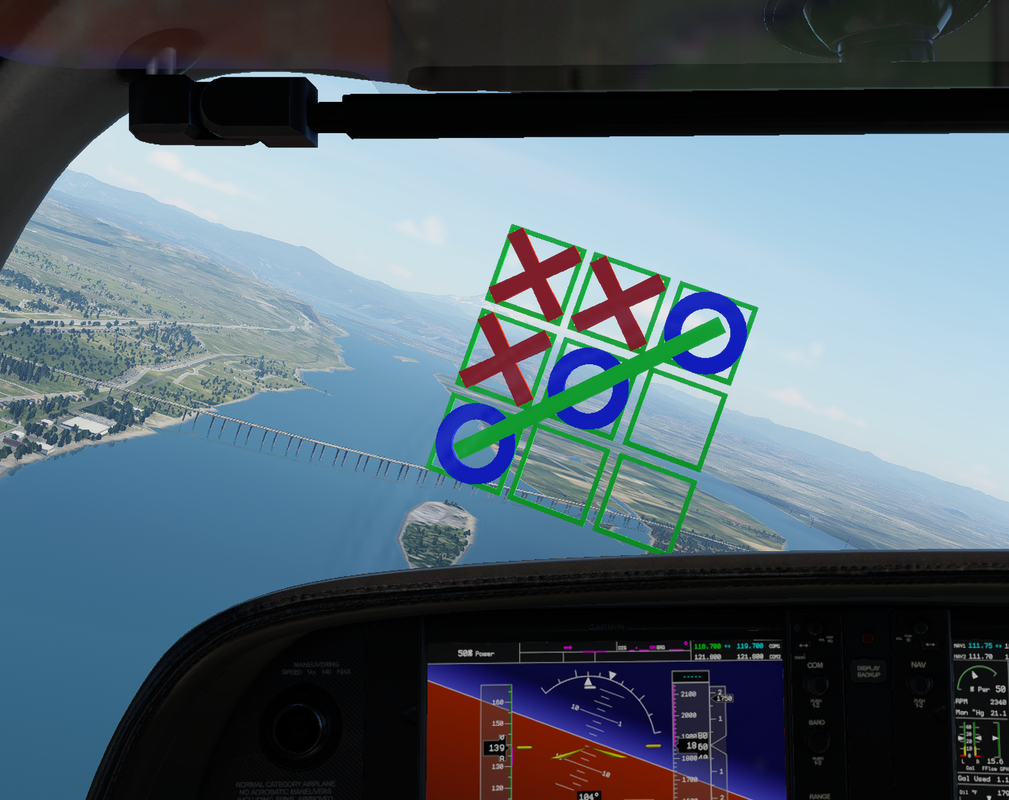
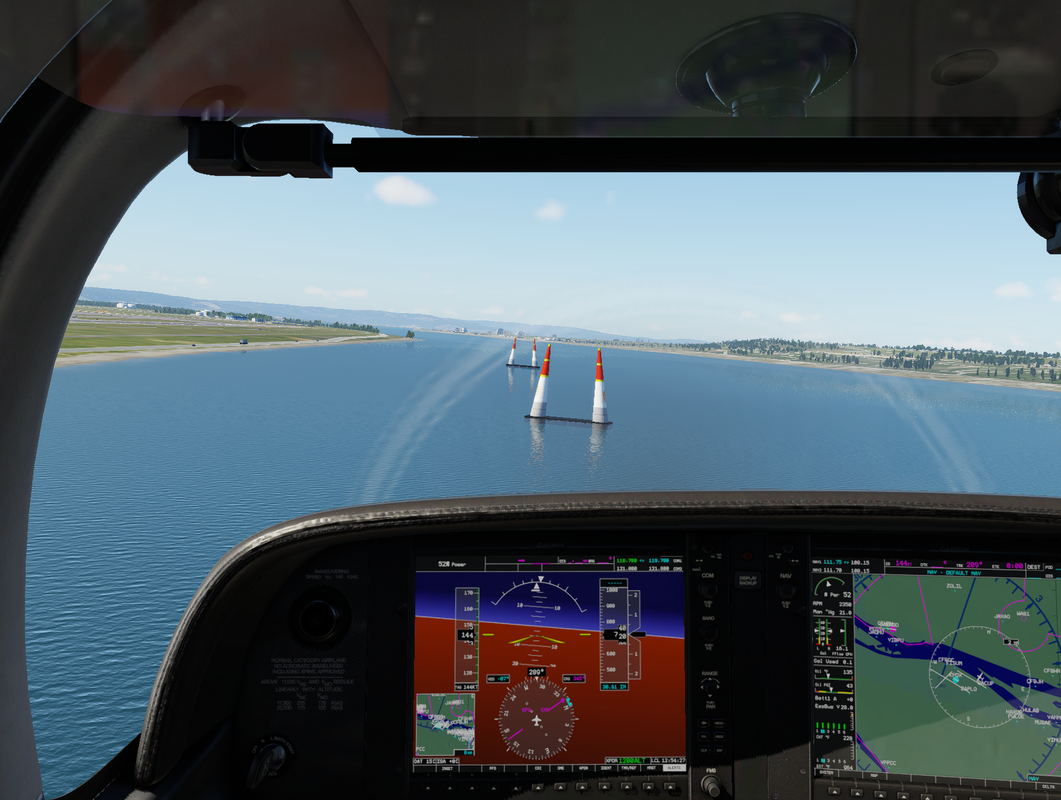
With this release, we are also introducing two new demo scenarios: a simple pylon course and a full game of Tic-Tac-Toe in the skies.
Picture
Picture
Fixed
  • Installer deleting all files in the scenarios directory
  • Arrays can be added multiple times to nodes one time for each index position
  • Add nodes popping up outside of the canvas area 
  • General generation and file structure repair
New
  • Aircraft placement now with action node 
  • data refs usable as input to node fields 
  • simple calculator node 
  • tool tips can turn on from view in main menu
0 Comments

First tutorial video is up

4/10/2024

0 Comments

 
0 Comments

v0.1.2-beta

3/29/2024

0 Comments

 
v0.1.2-beta is mostly a clean up and bug fix release no new node types, although we have some more that we identified that we need math is lacking, the ability to reposition the aircraft without loading  and the possibility of loading a situation or replay.  This release focused on usability with keyboard shortcuts file operations, copy, paste and organisation. undo/redo, node grouping and locking, and reusable modules are still in progress.  We identified some situations that caused the system to crash and have fixed them as we found them full details below.

Changes
  • Adding node keyboard shortcut changed from 'a'  to Shift+a
  • Some reconfiguration on simp file struct added id to Commands, Data refs, Sounds, and objects may have to delete and re add to scenario 
New 
  • Windows .exes details now Populated
  • Studio will validate settings for a scenario prior to generation and provide detail 
  • File New,  Open, Save , Save as now have keyboard shortcuts  Ctrl + 'n' | 'o' | 's'     Ctrl + Shift + 's'
  • Select all key board shortcut  Ctrl +  'a'
  • Copy, past  and cut now work Ctrl + 'c' | 'v' | 'x
  • Align and distribute in vertical and horizontal. Align Alt + 'h' | 'v'   distribute horz Alt + 'd'  or virt Alt +Shift + 'd'
Fixes 
  • Audio causing a crash on loading scenario if the scenario has ended or has been stopped
  • If a location field was set to zero the scenario load would  ignore all settings 
  • Clearing names of commands, data refs, sounds or objects crashing studio
  • Deleting nodes from the middle of a chain not updating connected node links
  • Renaming  or removing commands, data refs, sounds or objects now updates nodes that reference 
  • Renaming or removing triggers command nodes update commands that reference  
  • Scenario generation and formatting 
  • Radio buttons and selection lists not reflecting current settings
  • Sanitation of names for generation of scenario scripts
  • orphaned nodes execution when a start node is within the scenario
  • IDs reuse not getting lowest available
  • Node pins not getting properly set after a type change
  • Same names causing select and generation issues
  • Linux no longer needs to get GLEW and GLFW  packages  
  • First Demo Scenario moved from Seattle-Tacoma to Portland to align with X-Plane demo area  
0 Comments
<<Previous

    Author

    Join us as we explore Flight CodeX tips & tricks, features and more!

    Archives

    September 2025
    February 2025
    January 2025
    September 2024
    May 2024
    April 2024
    March 2024
    February 2024
    January 2024

    Categories

    All

    RSS Feed

© 2025 Scalar Development LLC
  • Home
  • About
  • News
  • Contact
  • Documentation